SHEET A-1Sample job · Lot 14 kitchenBid to install

From bid to install, however long it takes. Every change in between, on one job.

Bids, specs, drawings, approvals and a house that keeps moving its date. GCS Cabinet Manager keeps it all on one record, so nothing gets lost while the house goes up.Bid, specs, drawings, approval and every date change, on one record.

$599/mo · onboarding included Built by Lars Jarvi · selling cabinets since 1999 · Cabinetry Northwest, La Center WA
  1. Bid & ballpark sent“Kitchen, 2 baths, laundry”

    Ballpark from the budget estimator

  2. Job awarded · specs lockedAlder · Shaker · Chestnut stain

    Wood, door and finish set for drafting

  3. Drafting hand-offShop drawings returned, rev B

    Attached to the job for review

  4. Approval packagePlans + estimate approved

    Signed by homeowner · deposit invoiced

  5. House going up · builder schedule email“Cabinet install moved to Oct 8”

    Install was Sep 22 then Oct 1 now Oct 8 · applied automatically

  6. Framing · drywall · paint
  7. Field measure · orderMeasure confirmed on site

    Order released to production · ~3-week lead time

  8. Delivered · job boardCabinets in · install scheduled

    Crew and dates set for Oct 8 · homeowner notified

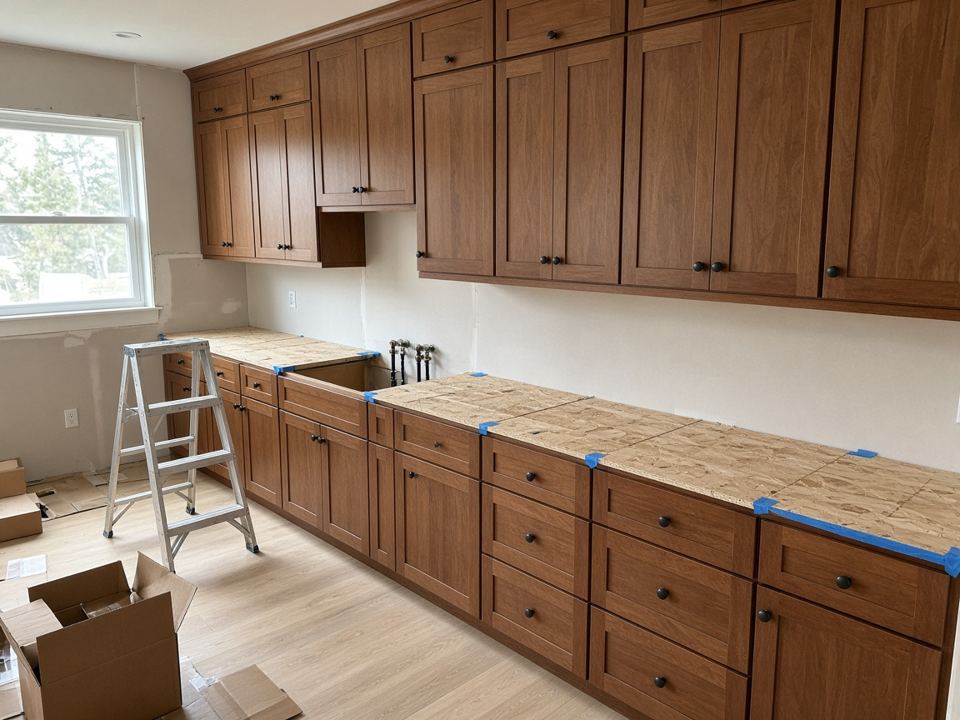
  9. Install · field appCrew uploaded photos

    Install day · trim-out scheduled

GCS CABINET MANAGERSAMPLE DATAREV B
Built for cabinet shops

Built for every hand-off.

A kitchen passes through sales, design, drafting, ordering, the shop, install crews and the homeowner. GCS Cabinet Manager keeps every hand-off on one record: who's up next, what's missing and what happens next.

Sell

Quote faster

Ballpark on the first call, then send a polished, versioned estimate priced from the final drawings and share it through a branded customer portal.

Spec

Get it right once

Design with the customer, then lock door, drawer, species, finish, hardware and trim per room, with a Spec Tracker that flags what's still missing.

Order

Release with confidence

Field measure and verify, updated drawings and signed approval come first, so nothing goes to production incomplete.

Track

Know where it stands

Builder date changes, install scheduling, field notes and photos, alerts and billing, all on the job.

For your whole team

Everyone works from the same job.

The office

Sales, project managers and owners see the pipeline, who has the ball, and every date and dollar on the job.

Designers & drafters

Complete room specs, design boards and a drafter sheet up front; drawings and CAD come back to the job.

Installers & field crews

Schedules, specs, photos, notes and marked-up plans on iPhone and iPad, right at the job site.

Homeowners

A customer portal shows their draft, rooms, key dates, documents and who to call, under your shop's name.

How a job flows, start to finish

Ten steps, one project record. Here's the path a kitchen takes through GCS Cabinet Manager, shown on a sample job.

Sell

Quote the first call

The Budget Estimator turns a phone call into a ballpark: pick door style, finish and cabinet runs by the linear foot, compare options side by side and export a PDF.

  • Comparison options for series and species
  • Save as a project when the customer is ready
Budget Estimator
Budget Estimator for a sample homeowner: a Shaker kitchen with base, wall and tall runs by the linear foot, Option A in Alder at $3,960.00 and Option B in Maple at $4,356.00
Sell

Open the project

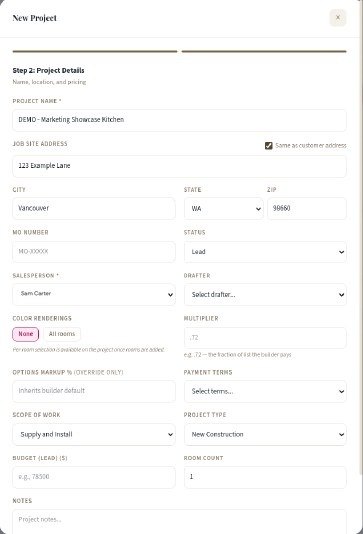
A guided New Project form captures the customer, job site, salesperson, scope and terms once. Every tab after it (rooms, estimate, schedule, billing) inherits the details.

  • Construction stage and key dates on the overview
  • Customer and vendor items tracked per job
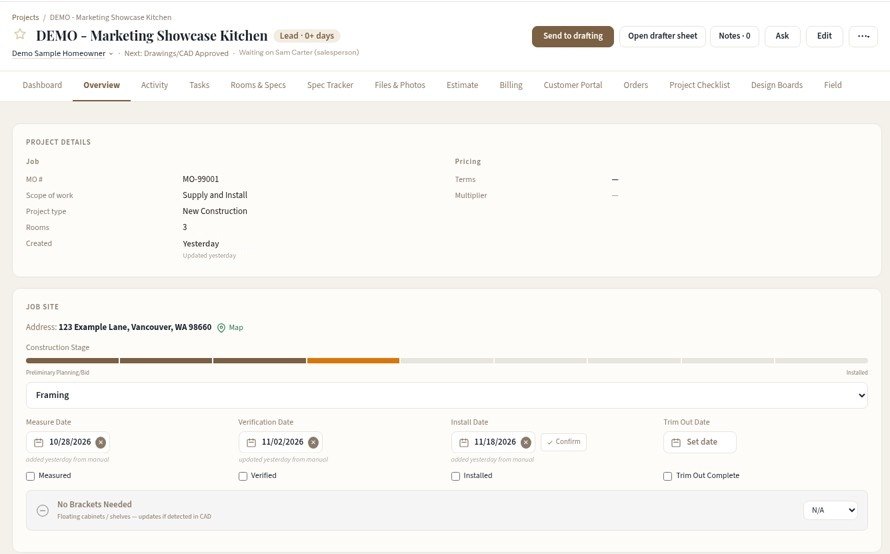
Projects · Overview
Project overview for a sample kitchen job
New Project form
Spec

Design with the customer

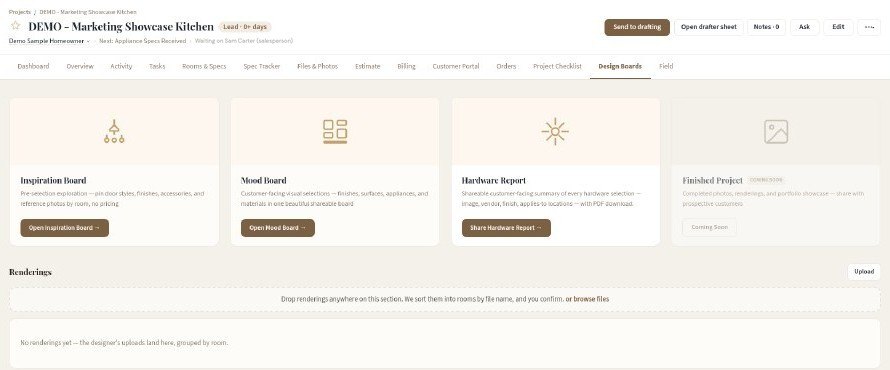
Inspiration and mood boards, a shareable hardware report and renderings, all kept on the job. Style Finder helps customers see door, species and finish together, and the Design Library lets them pick doors side by side.

  • Renderings sorted into rooms by file name
  • Doors compared side by side in the Design Library
  • Hardware report with PDF download
Projects · Design Boards
Design Boards tab with inspiration board, mood board and hardware report
Spec

Define and lock the rooms

Add the kitchen, baths and laundry, then set door style, drawer fronts, species, finish, hardware and trim for each room. The Spec Tracker shows what's confirmed, needs review or is missing, and you approve and lock room by room or all at once.

  • Each room carries its own price
  • Custom paint matches signed off before anything is ordered
  • One-click spec sheet
Projects · Rooms & Specs
Rooms and Specs for a demo job: six rooms from Kitchen to an optional Great Room, each with series, door, species and finish and its own price
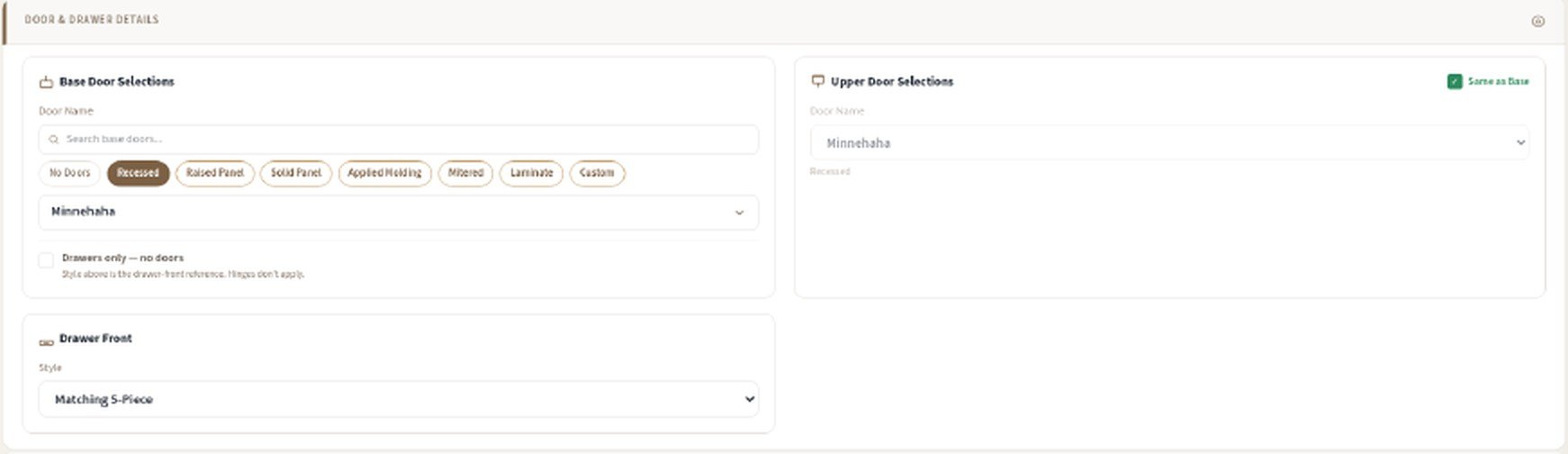
Kitchen room detail: base door selections with Recessed Minnehaha doors, upper doors same as base, and a matching 5-piece drawer front
Spec

Hand off to drafting

“Send to drafting” moves the job to the drafter with a drafter sheet and the full spec. Drawings and CAD files come back to the project, and the checklist carries it through design and measure.

  • Shared checklist from pre-production to close-out
  • Every item owned by a role: salesperson, drafter, measurer
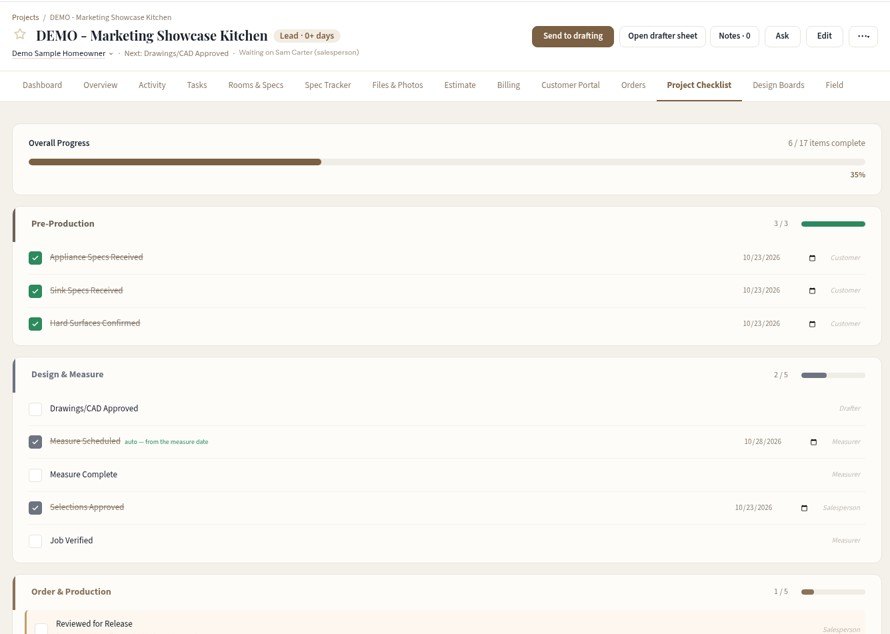
Projects · Project Checklist
Project checklist grouped into Pre-Production, Design and Measure, Order and Production
Sell

Estimate and plan approval

Room-by-room pricing from the final drawings lands on an estimate with your logo, allowances, tax and a signature block. Publish it with the drawings to the customer portal, and the homeowner approves plans and price together.

  • Versioned estimates with follow-up dates
  • Approval seals a signed approval package
  • The deposit invoice follows the approval
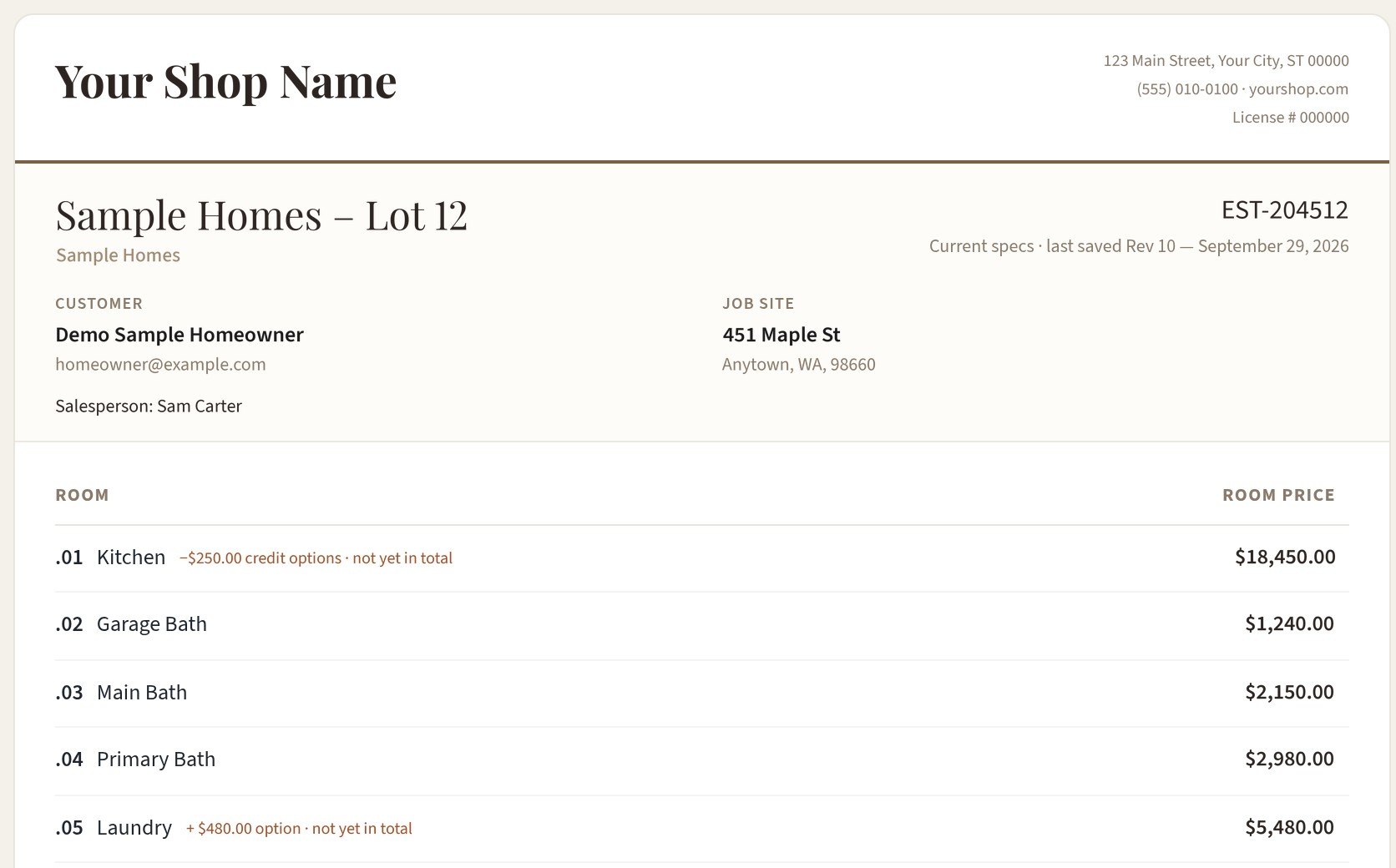
Projects · Estimate
Estimate for a demo job on your shop letterhead: customer, job site and room-by-room prices
Track

The house goes up

Months of framing, drywall and paint, and the builder's dates move. Forward schedule emails or PDFs, see the new date next to the current one and apply it in one click.

  • Install dates stay current without retyping
  • The Job Board flags install risk early
Inbox · Builder schedules
Forwarded builder schedule for demo jobs: each change shows the new date beside the current one, with an Apply this job button
Order

Field measure and release the order

Once plans are approved and the house is ready, measure and verify on site. If the measure changes anything, drawings are updated first; the order releases to production once sign-off is in place.

  • Measure and verify reports with photos, filed to the job
  • Lead time tracked to delivery, typically weeks, varying by manufacturer
Projects · Field
Field timeline on a demo job: issues sent to the builder with photos, verify and measure visits, and the measure report with site information and report status
Track

Schedule and install

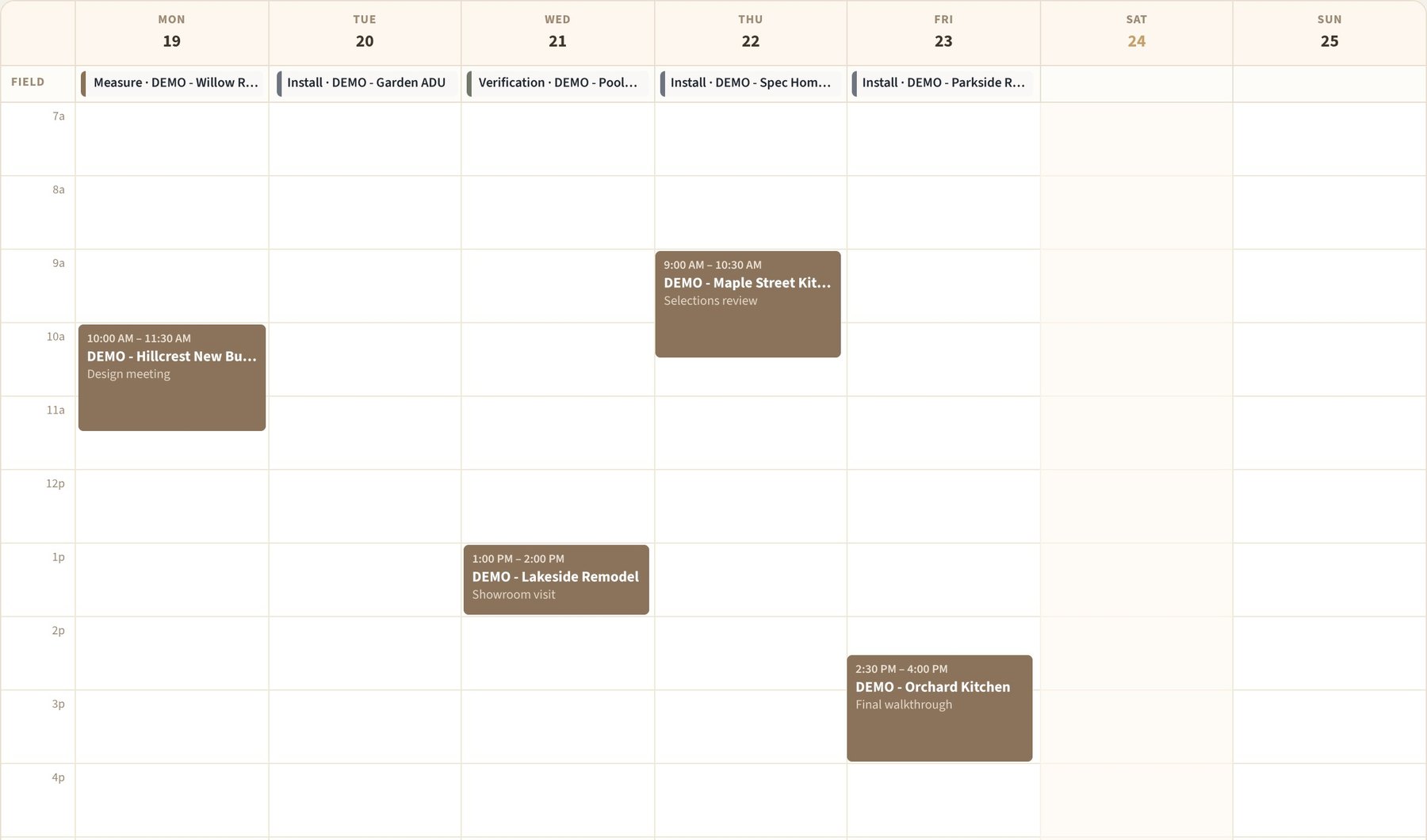
The Job Board and shared calendar set install dates and crew. In the field, crews run Measure, Verify, Install, Trim Out and Warranty reports, take photos and log issues, and the office sees it on the job right away.

  • Install-risk rows flagged automatically
  • Day, week and month calendar views
  • “Let the office know” in one tap
Job Board
Job Board for demo jobs: days to install, stage, site status, and measure, brackets, verify, install and trim-out dates
Calendar · Week
Week calendar with demo field events (a measure, installs and a verification) and appointments
Close

Bill and close out

Deposits, invoices, payments and overages follow the approved estimate. QuickBooks stays your books; a direct QuickBooks link is coming soon.

  • Balance, invoiced and paid at a glance
  • Close-out checklist before the job is done
Projects · Billing
Billing tab on a demo job: terms and payee, deposit, overage, and a balance card with estimate total, invoiced and paid
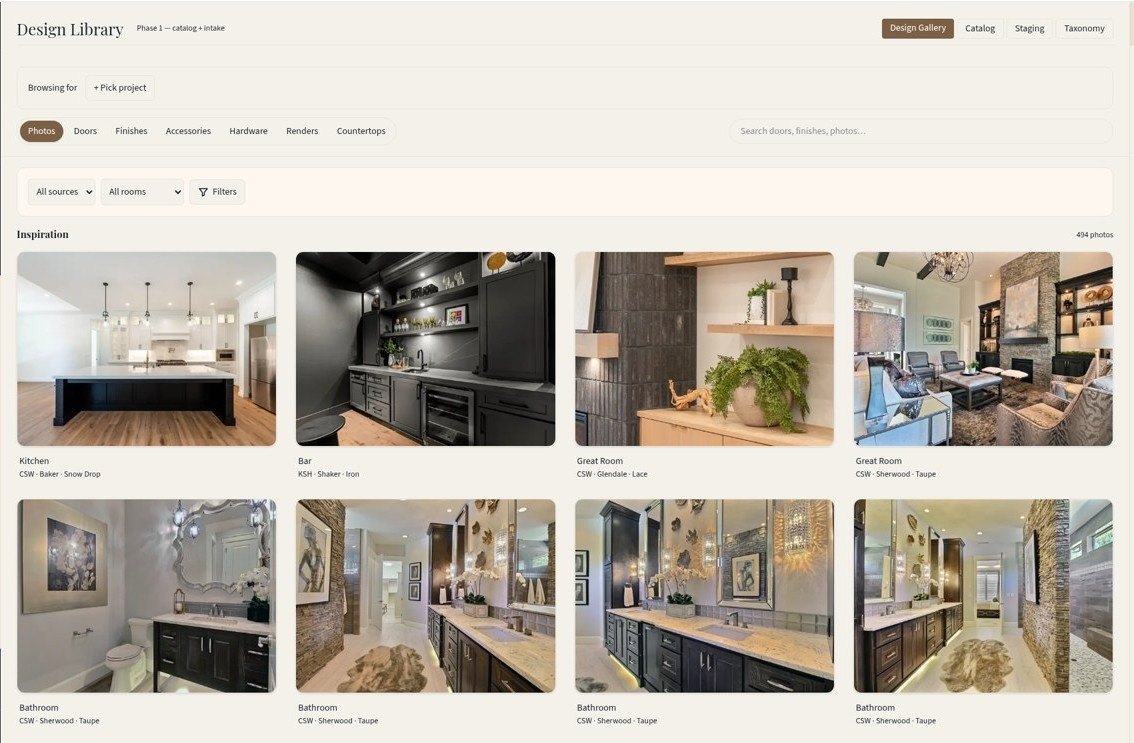
Design Library

Pick doors side by side.

Help the customer choose with the whole library in front of them, right on their job.

  • Browse doors, finishes, hardware and countertops by style.
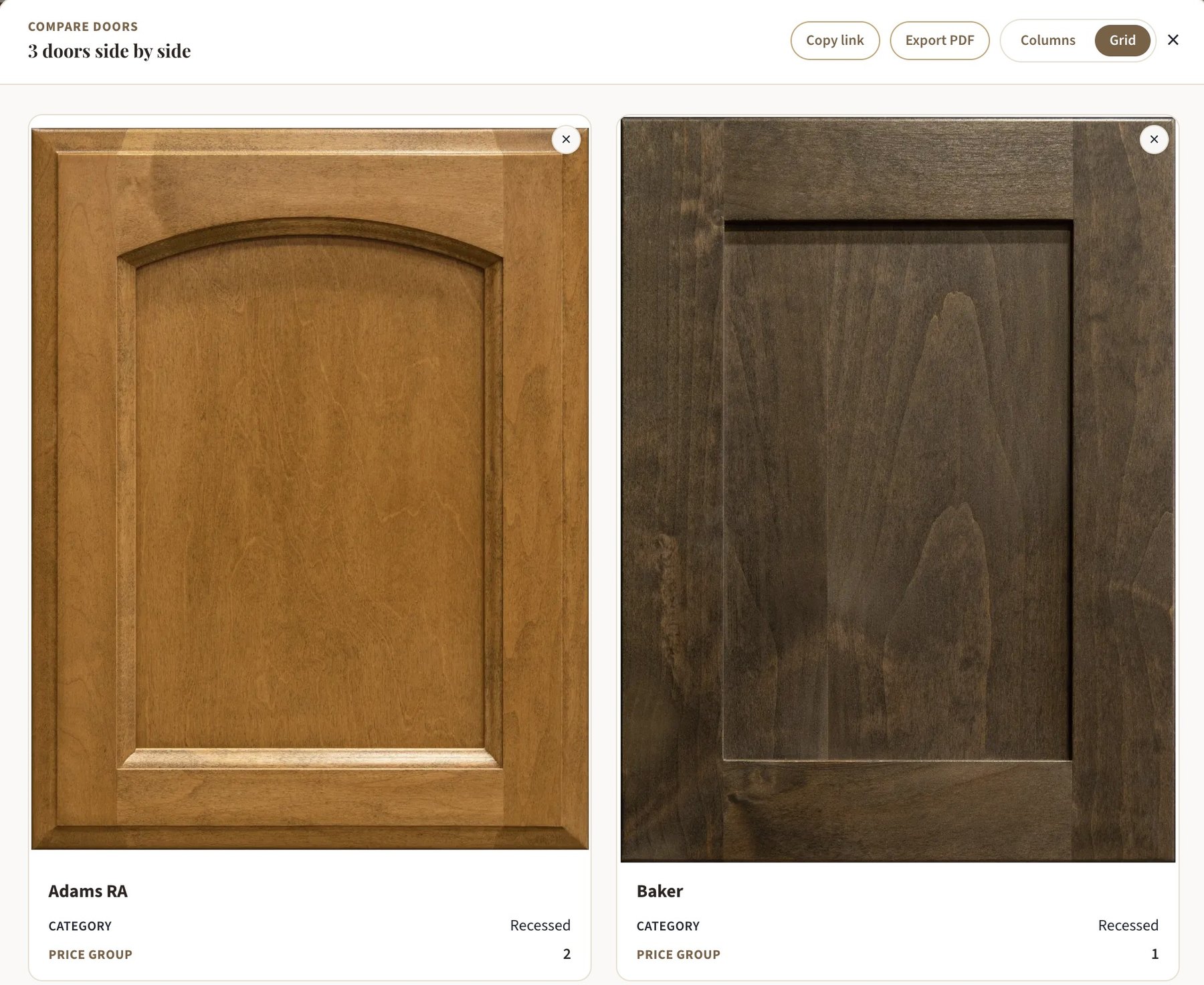
  • Compare up to 4 side by side, with price group.
  • Pin to the job board, or send a brochure, share link or PDF.
Design Library · Doors
Design Library doors tab for a demo job: style filters, a compare tray with three doors, and Pin and Brochure buttons on each door
Browse by style. Filter by door style, add doors to compare, and build a brochure as you go.
Compare doors
Compare doors window showing door styles side by side with category and price group, plus Copy link and Export PDF
Side by side. Category and price group on every card. Copy a link or export a PDF. Sample data shown.
Renderings & hardware reports

Show them, not just tell them.

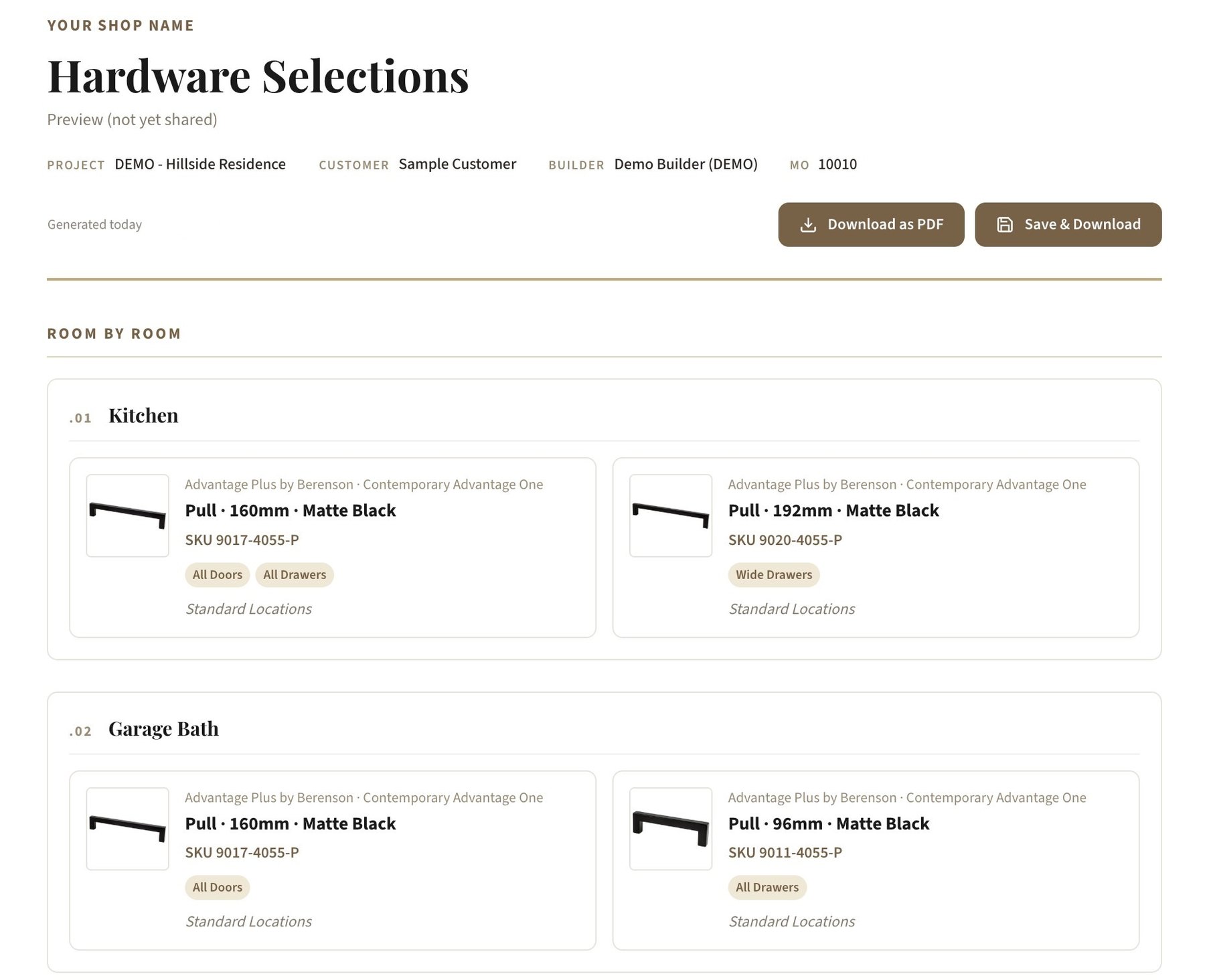
Publish color renderings, room by room, to the customer portal. Then send a clean hardware report with every pull and knob by room, as a shareable link or a PDF, that looks great on a phone.

Project · Design Boards
Design Boards tab on a demo project: Inspiration Board, Mood Board and Hardware Report cards, and a Renderings row of four kitchen color renderings ready to publish to the portal
Renderings sorted by room and published to the customer portal in one click. Sample data shown.
Hardware Selections
Hardware Selections report for a demo project: Berenson matte black pulls listed room by room for the kitchen and garage bath, with SKUs and where each one goes, plus Download as PDF
Room by roomEvery pull and knob with its SKU, finish and where it goes. Download as a PDF.
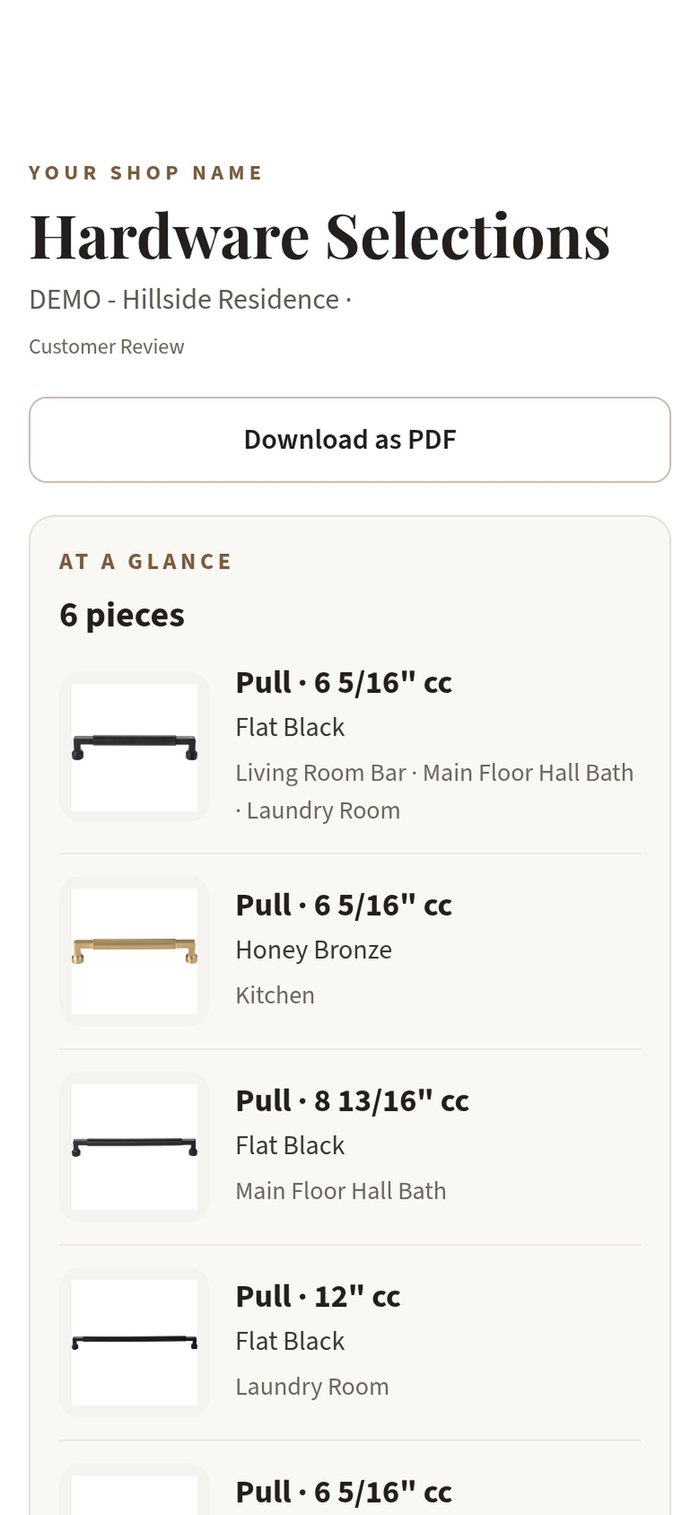
The shared hardware report on an iPhone: an at-a-glance list of pulls with finishes and the rooms they go in
One link to shareThe customer opens it on a phone. No login needed.
Custom paint matches

Custom colors, matched and signed off.

Track every custom paint or stain match from the first request to the factory to the customer's sign-off.

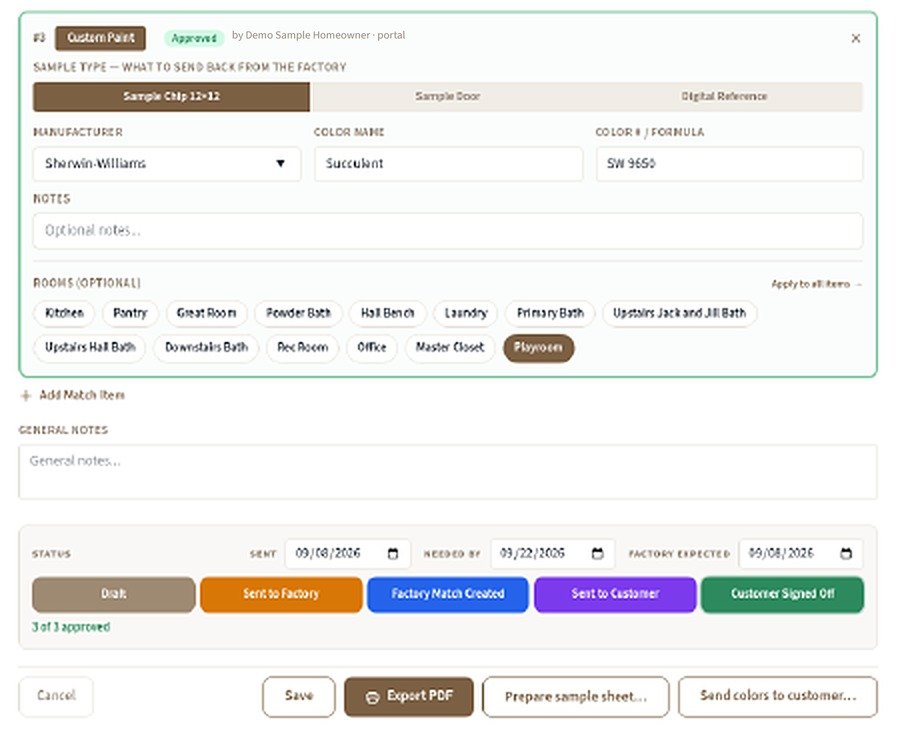
  • Draft to signed off, on one status row with sent, needed-by and factory dates, for every color by room.
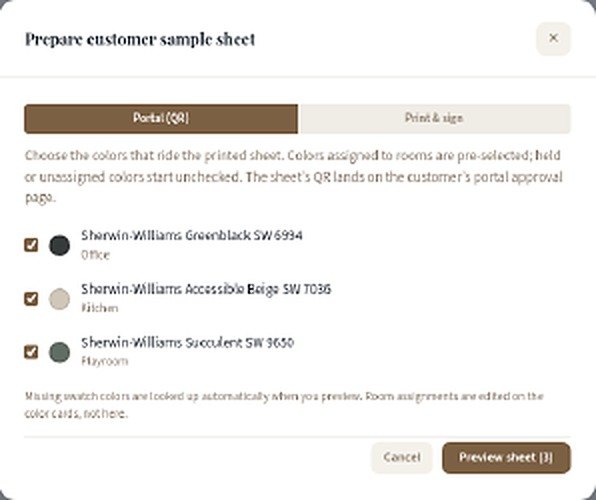
  • A sample sheet to approve, with a QR code to the portal or a line for a pen signature.
Finish Match · Custom paint
Finish Match order: a Sherwin-Williams Succulent SW 9650 custom paint item for the playroom marked Approved by Demo Sample Homeowner in the portal, with the Draft to Customer Signed Off status row and 3 of 3 approved
Prepare customer sample sheet, Portal (QR) tab, with Sherwin-Williams Greenblack SW 6994, Accessible Beige SW 7036 and Succulent SW 9650 swatches
Professional PDF estimates

Branded PDF estimates in one click.

Turn the rooms you've priced into a clean, multi-page estimate with your logo and your terms, ready to email or print for the customer.

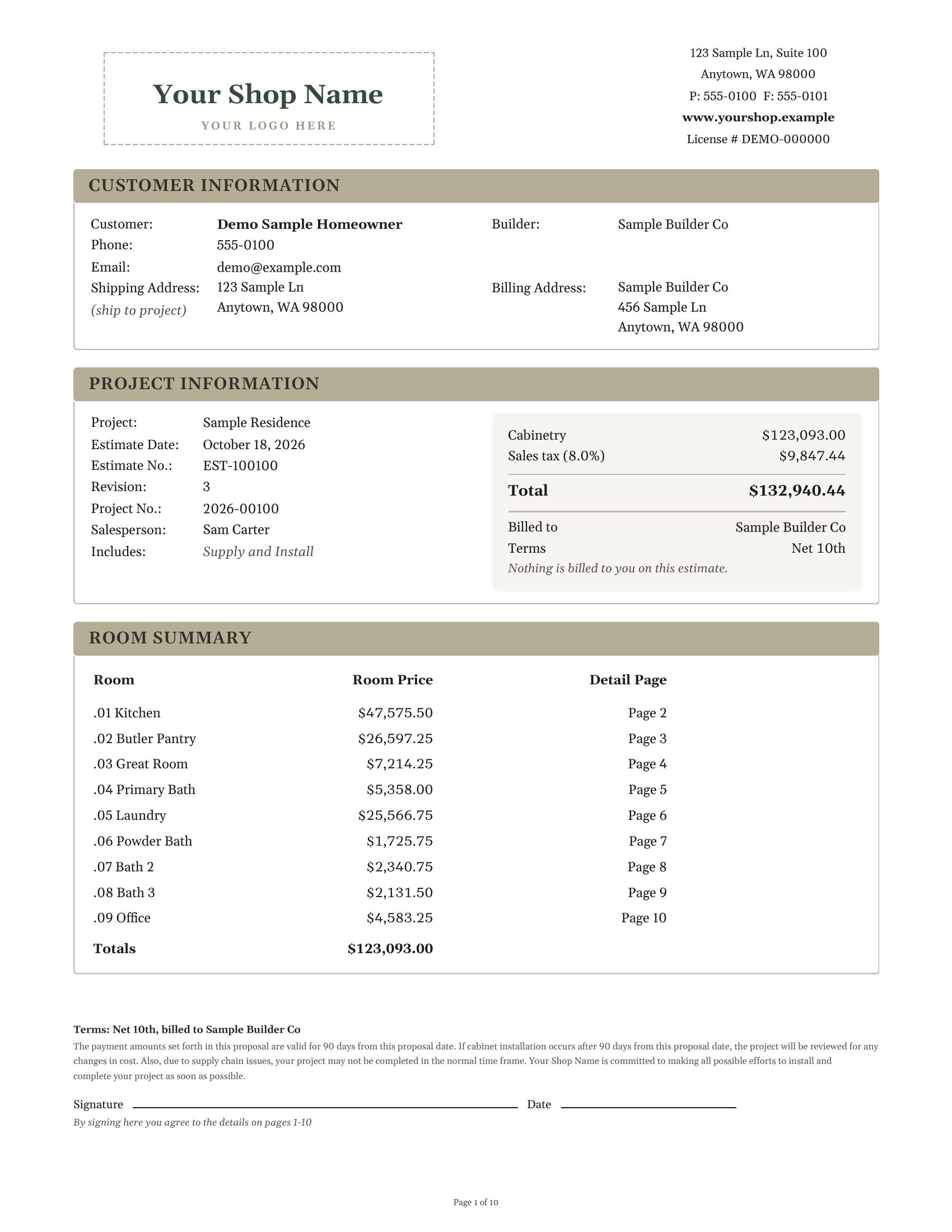
  • Room-by-room pricing. A summary page lists every room with its price and the page its details are on.
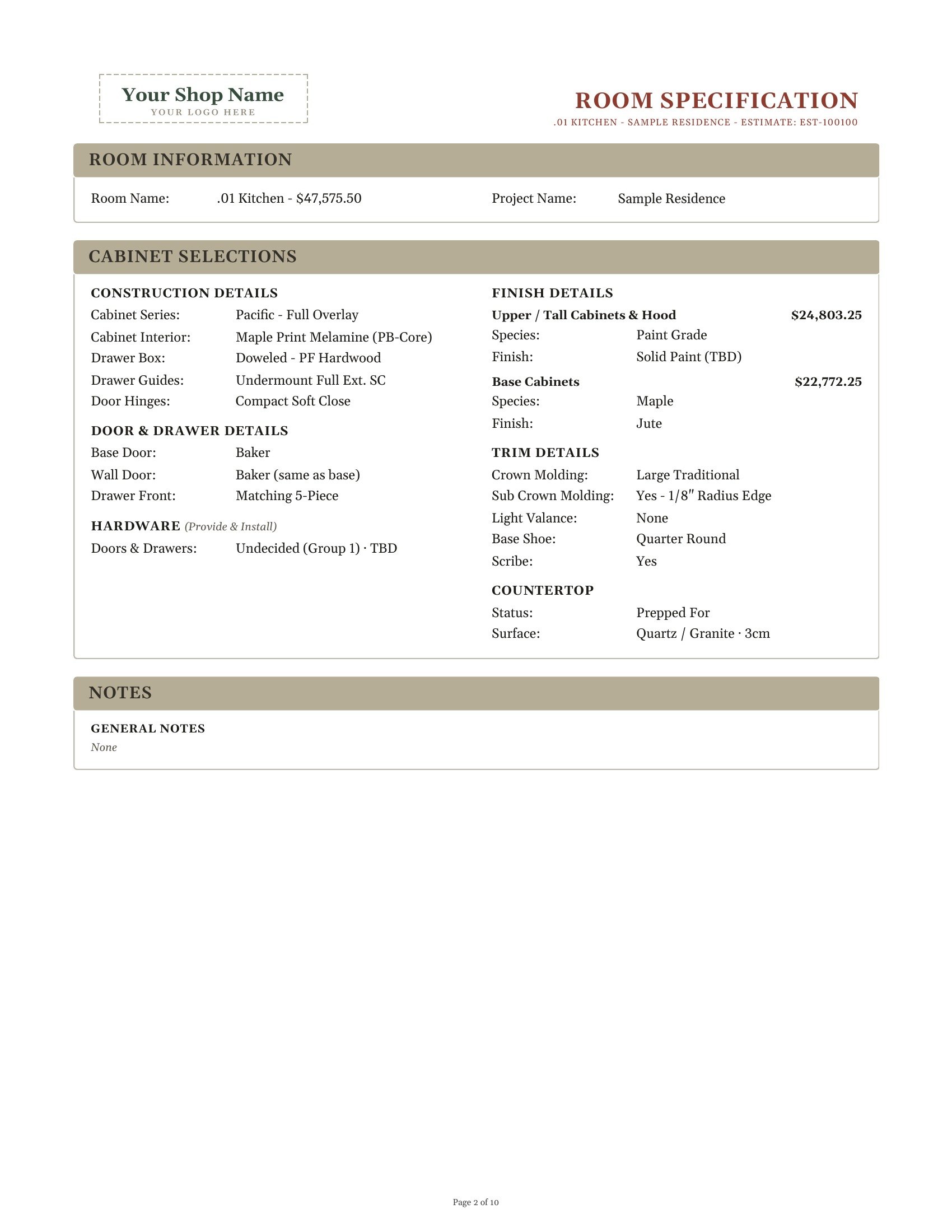
  • Full specs for every room. Construction, doors and drawers, finishes, trim, hardware and countertops on their own page.
  • Totals with tax. Subtotal, sales tax and the total, plus who's billed and the payment terms.
  • Your logo and terms. Your shop's name, address, license and proposal terms on every estimate.
  • Ready to sign. A signature and date line, and each revision gets its own estimate number.
Estimate room specification page for .01 Kitchen: construction, door and drawer, hardware, finish, trim and countertop details with upper and base cabinet prices
Estimate page 1 with a Your Shop Name logo placeholder: customer and project information, a cabinetry total of $123,093.00 plus 8% sales tax for $132,940.44, a nine-room summary, proposal terms and a signature line
Estimate EST-100100.pdf · 10 pages
Page 1 with the totals and room summary, then a spec page for each room. Sample data shown.
Customer portal

Keep homeowners in the loop.

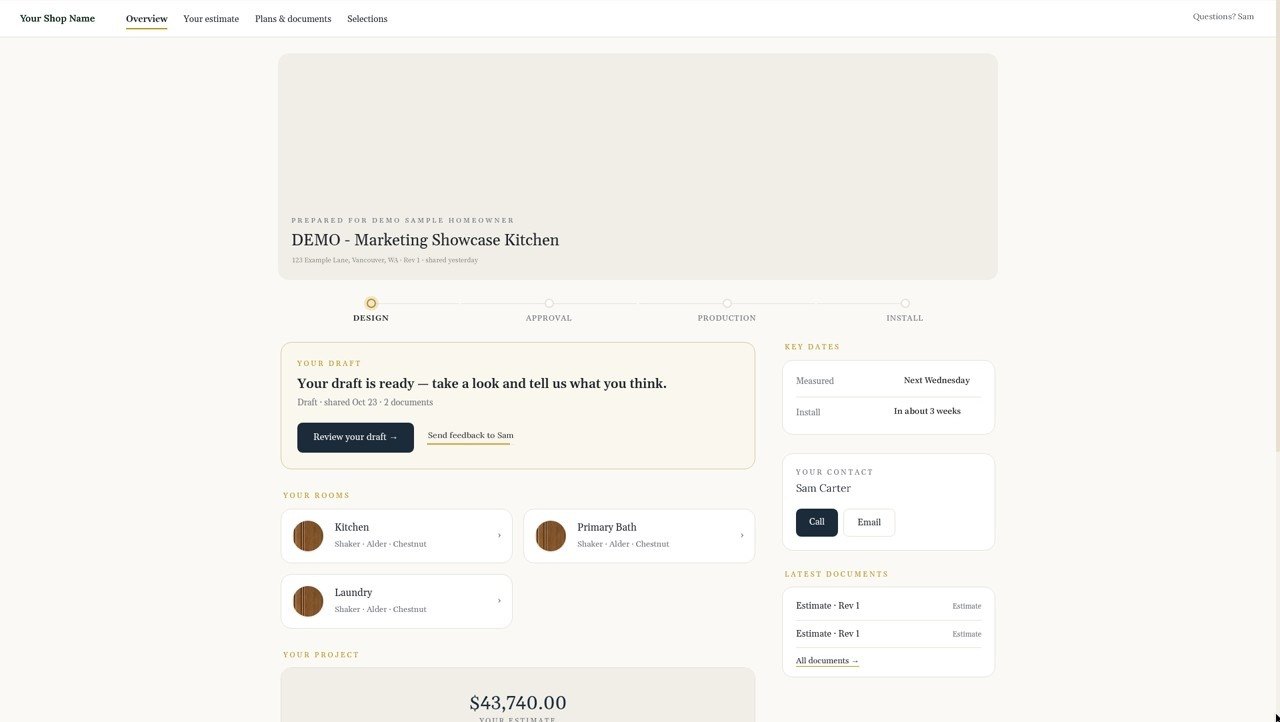
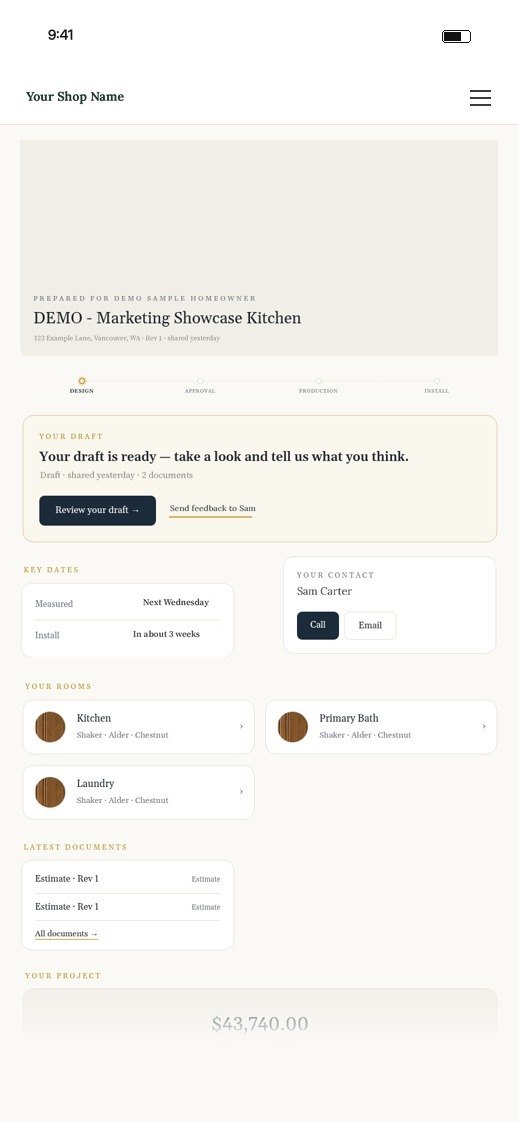
Publish a branded portal for each job, so homeowners can review drafts, see their rooms and selections, check key dates and open documents without calling the office.

  • Draft review. “Your draft is ready”, with one tap to review or send feedback.
  • Where things stand. Design, approval, production and install, on a simple progress line.
  • Rooms and selections. Door, species and finish for every room.
  • Dates, documents and a contact. Measure and install dates, the latest estimate and who to call.
  • Your shop's name on it. You choose which sections to publish, and when.
Customer portal · Overview
Customer portal for a sample kitchen: draft ready for review, progress, key dates, contact and rooms
The same customer portal on a phone
Approval, on a phone

Plans, upgrades and a signature in one place.

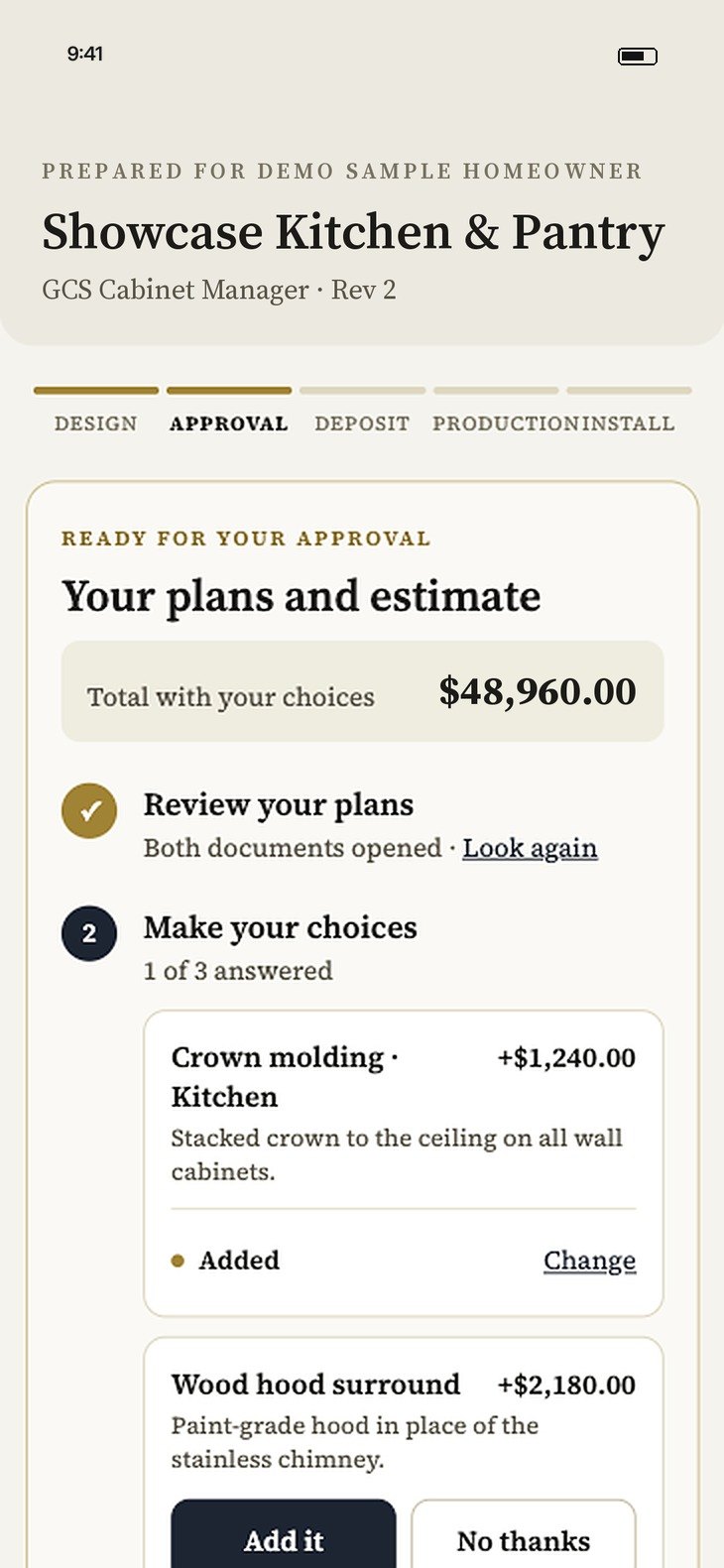
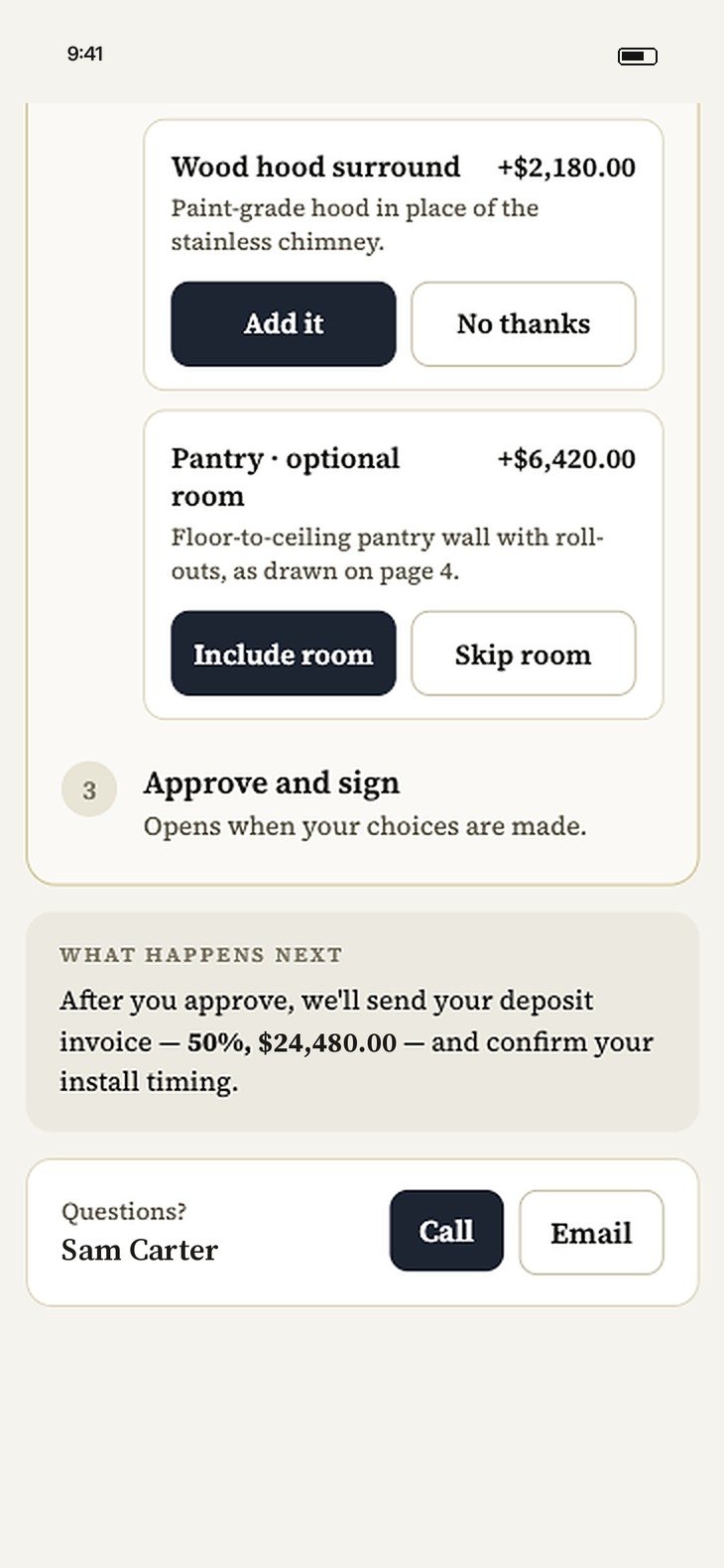
The approval page walks homeowners through each step: review the plans and estimate, choose optional upgrades, then approve and sign.

  • Review your plans. Drawings and the estimate open right in the portal.
  • Make your choices. Optional upgrades with their prices, and the total updates as they decide.
  • Approve and sign. Then the deposit invoice and install timing follow, with a call or email button if they have questions.
Customer approval screen on a phone: Showcase Kitchen & Pantry, progress steps, a $48,960.00 total and optional upgrades
The same approval screen scrolled: optional pantry room, Approve and sign, what happens next and a Questions? contact
Customers review plans, pick upgrades and approve, all from their phone.
Signed approval package

Every approval, on the record.

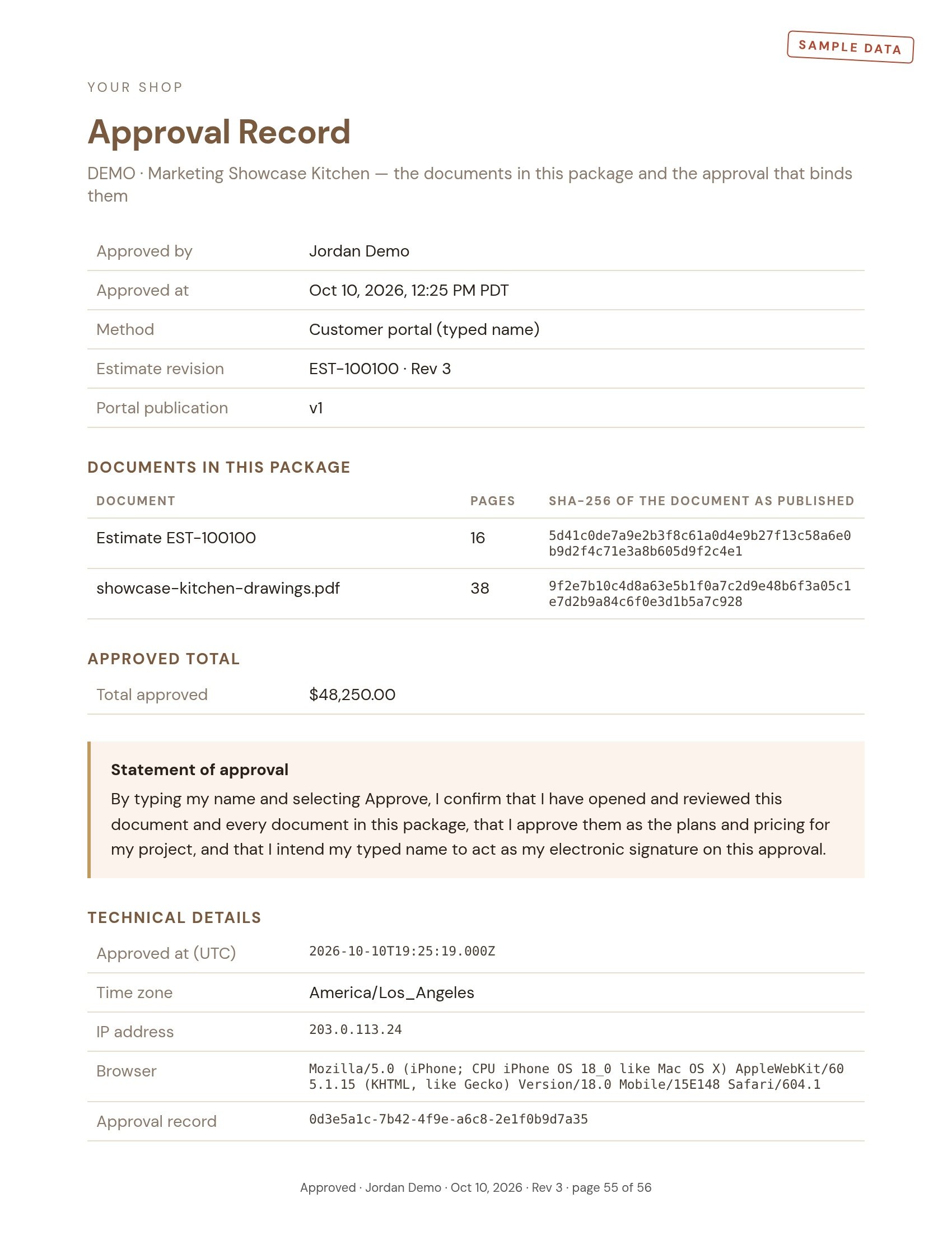
When a customer approves in the portal, GCS Cabinet Manager seals the estimate and every drawing into one package, stamped on every page. An Approval Record at the end shows who approved, when and how, the approved total, and a fingerprint of each document, so anyone can confirm it's exactly what they signed.

  • Estimate and full plan set in one PDF
  • Who, when, how, from which device
  • Proof the documents weren't changed after approval
Sample Approval Record page for DEMO · Marketing Showcase Kitchen: approved by Jordan Demo on Oct 10, 2026 through the customer portal (typed name), estimate EST-100100 Rev 3, two documents with page counts and SHA-256 fingerprints, an approved total of $48,250.00, the statement of approval and technical details, stamped page 55 of 56
Sample data shown.
Builder schedule Inbox

Builder schedules, applied for you.

When a builder moves a date, GCS Cabinet Manager reads the update and lines it up against the job, so nobody retypes a schedule.

  • Forward builder schedule emails or PDFs.
  • See the new date next to the current one.
  • Apply it to the job in one click.
Inbox · Builder schedules
Forwarded builder schedule for demo jobs: each change shows the new date beside the current one, with an Apply this job button
Sample data shown.
iPhone app for field crews

On the job site, on your iPhone.

Installers and measurers get the day's schedule, the job's address and specs, and one-tap photos, notes and issues, all filed to the right project for the office.

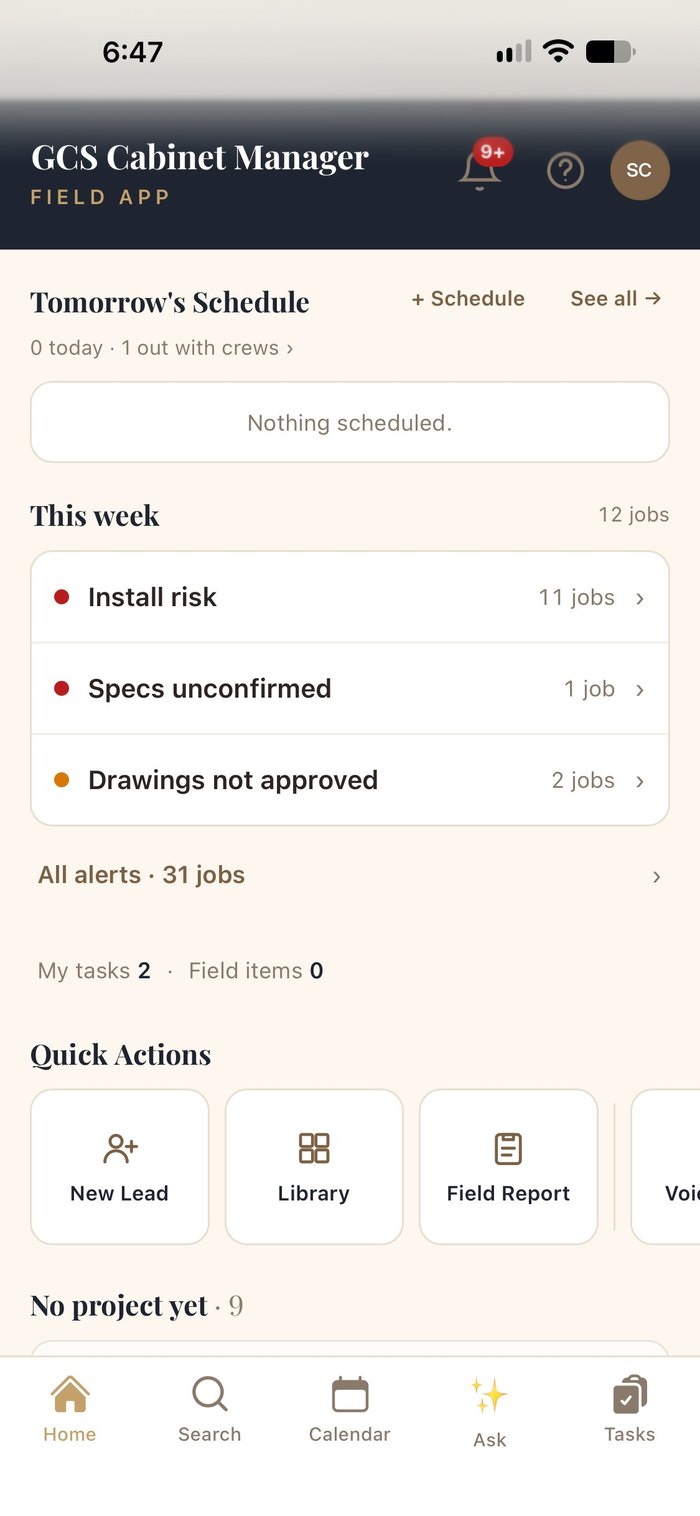
Field app home: tomorrow's schedule, this week's alerts and quick actions
Schedules & alertsTomorrow's schedule, install risks, and each job's address with a map pin.
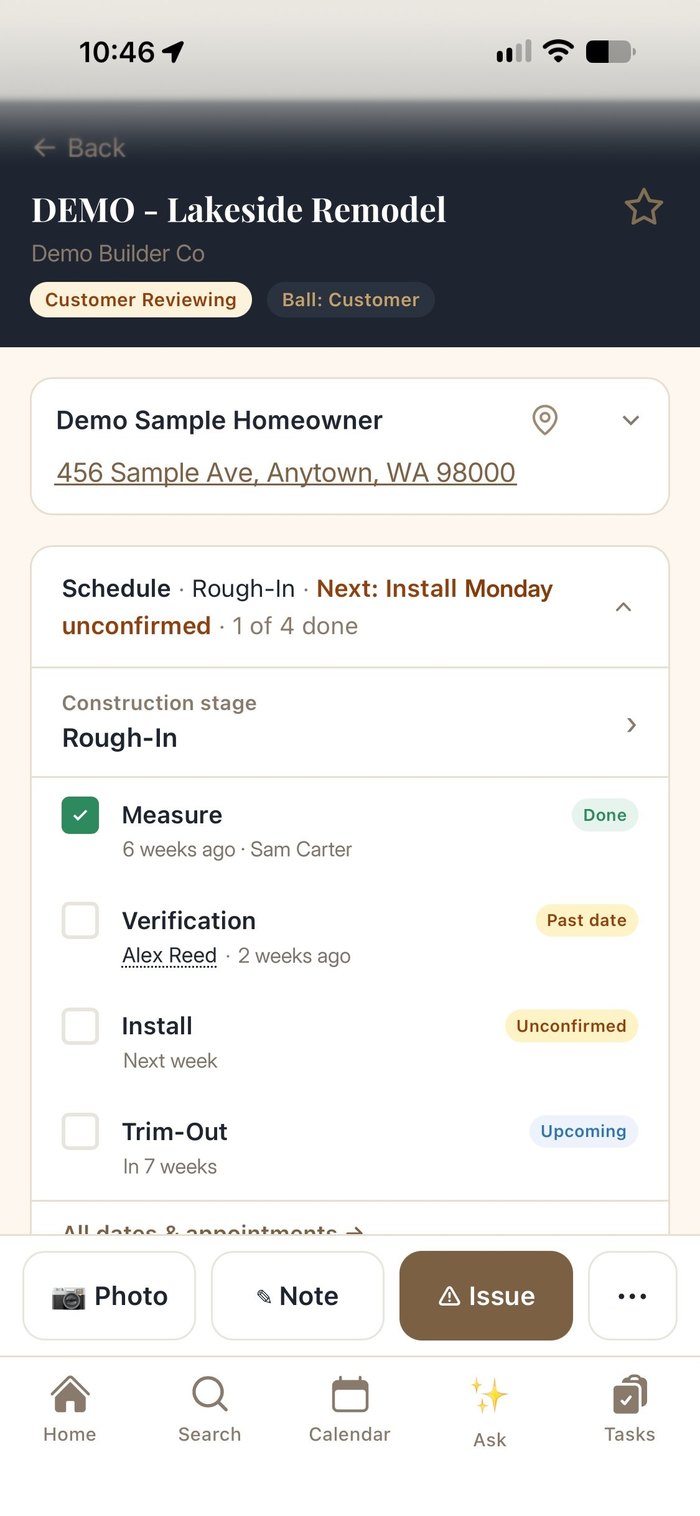
Job schedule on iPhone: measure done, verification past date, install unconfirmed and trim-out upcoming, each with dates and crew
Every step, on scheduleMeasure, verify, install, trim-out and warranty reports, with dates and crews.
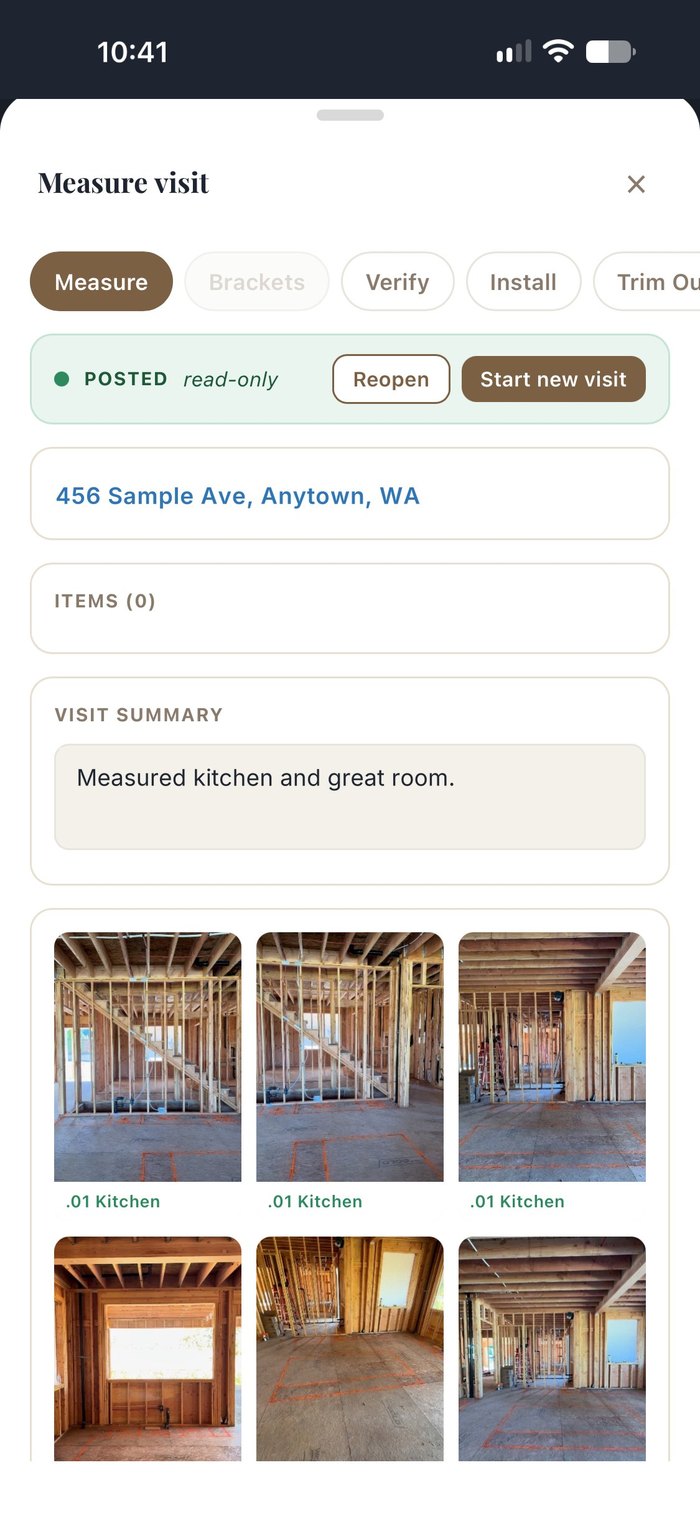
Measure visit on iPhone: job address, visit summary and job-site photos filed by room
Photos, notes & issuesPhotos tagged by room, notes you can dictate, and issues logged on the spot.
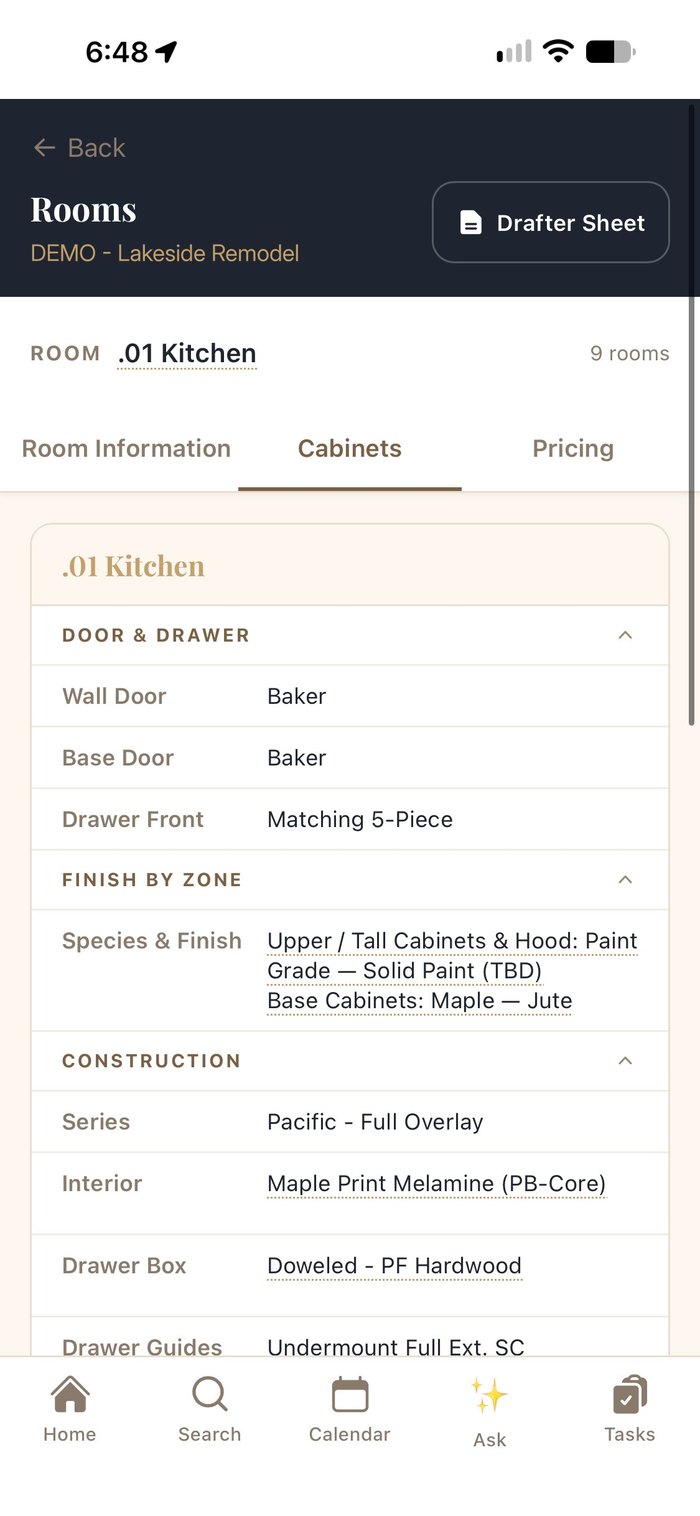
Room cabinet specs on iPhone: door, drawer, finish and construction
Specs in your pocketDoor, drawer, finish and construction for every room.
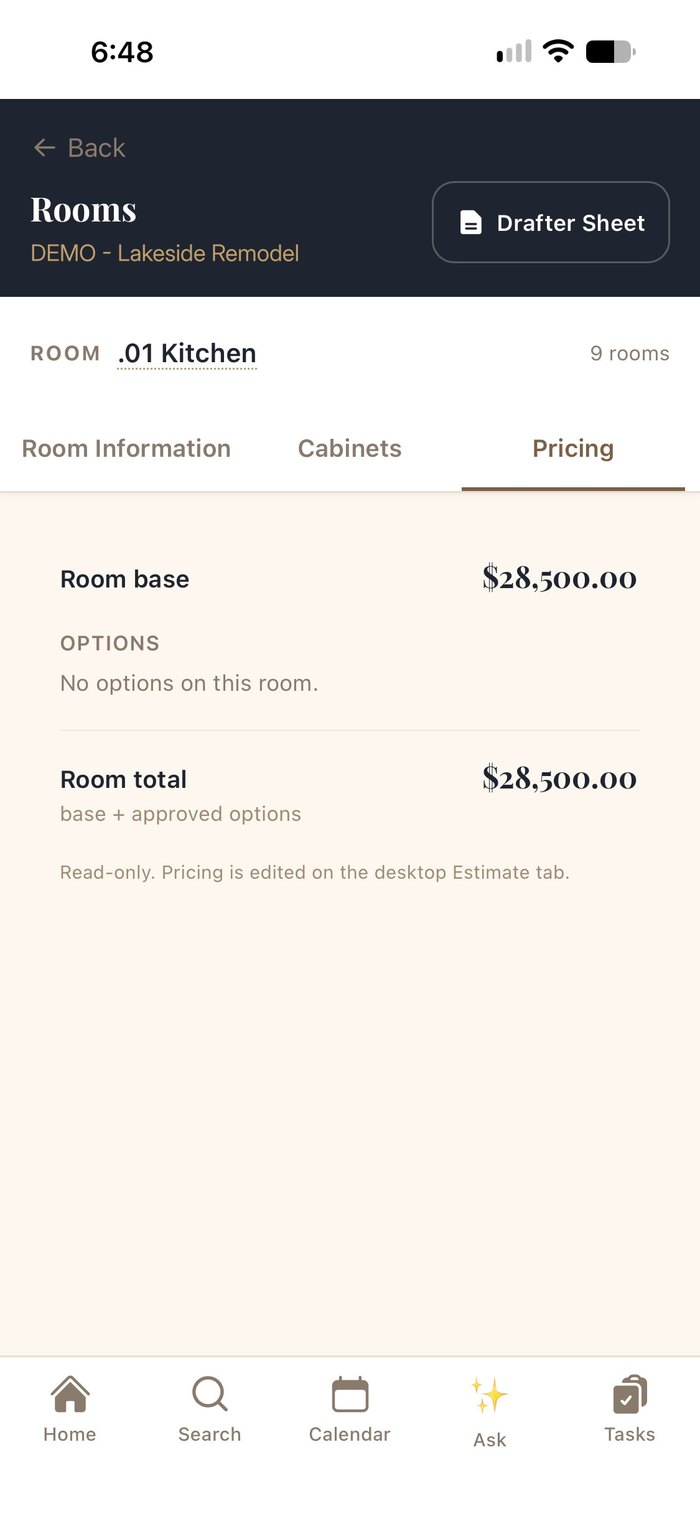
Room pricing on iPhone, read-only
Pricing at a glanceRoom totals at a glance; pricing stays locked to the office.
On the iPad

Mark up plans right in the app.

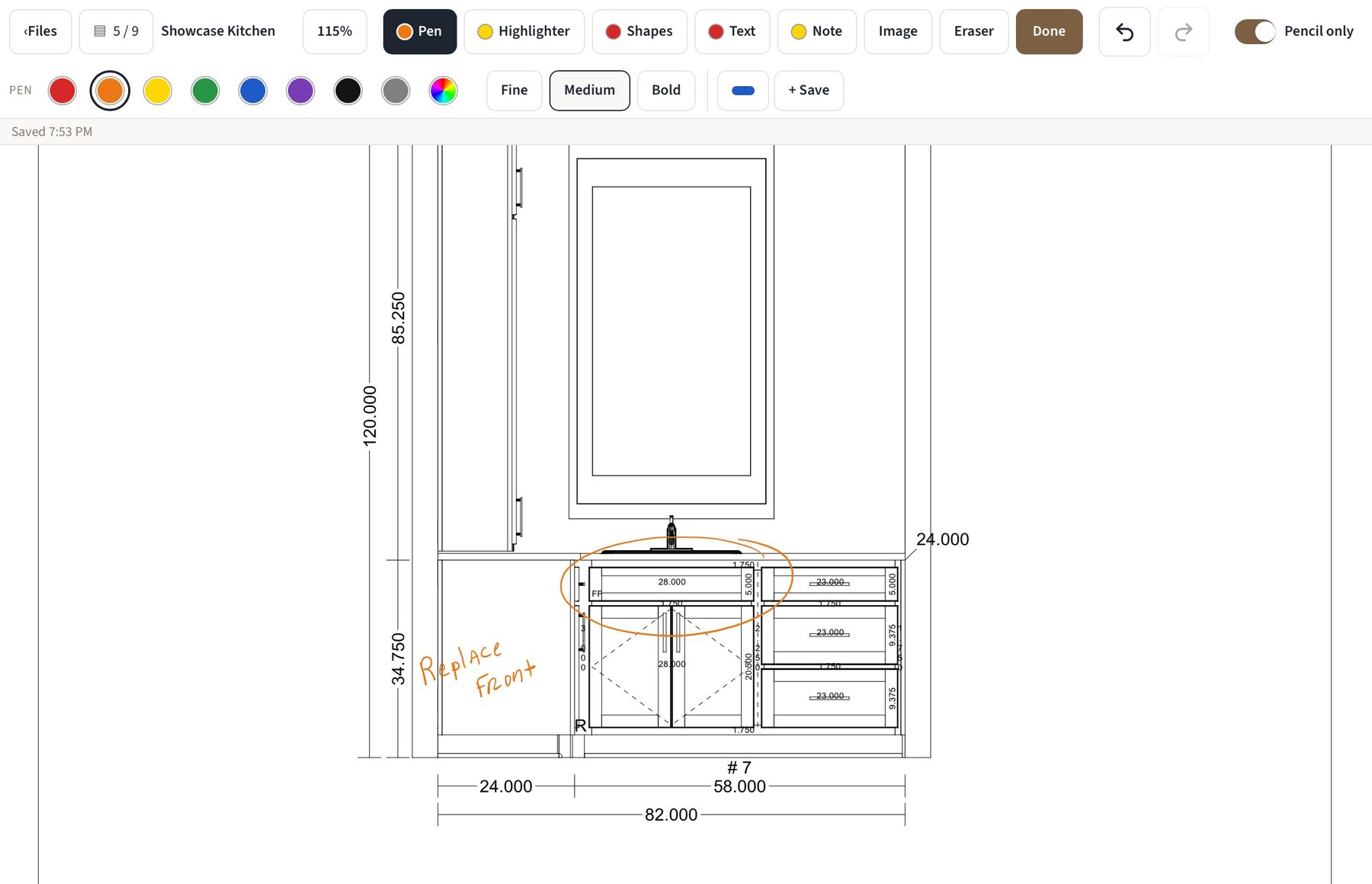
Open shop drawings or any PDF on the job and annotate them with a pen, highlighter, shapes, text and sticky notes, or drop in an image. Markups save back to the job, so the office and the shop see the same notes.

  • Apple Pencil support, with a pencil-only mode so your palm doesn't draw.
  • Pen, highlighter, shapes, text and notes, in any color and line weight, with undo and an eraser.
  • Saved to the project, next to the drawings and CAD files.
Cabinet elevation on iPad with an orange pen circle around the sink base and a handwritten Replace Front note
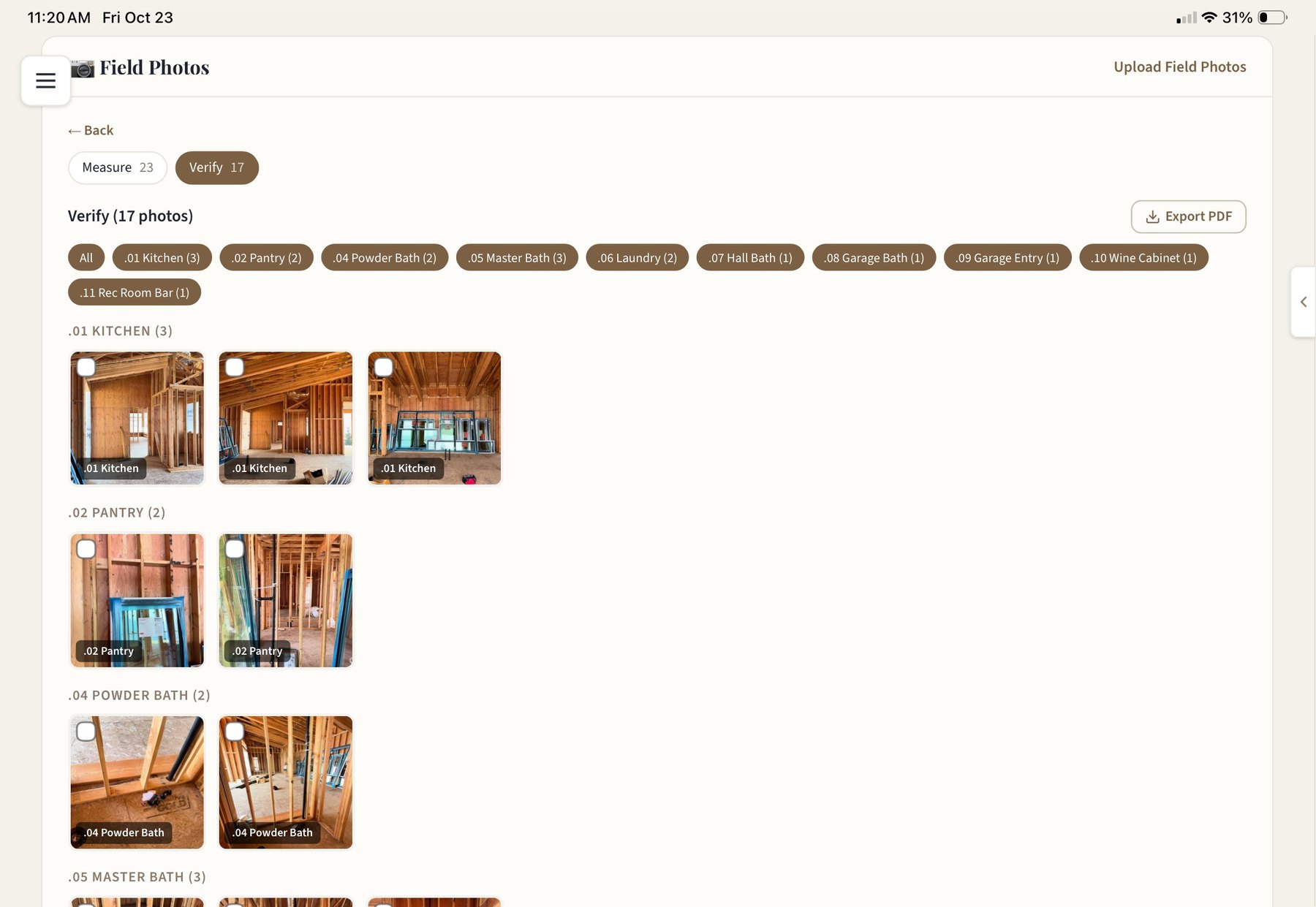
Field Photos on iPad: verify photos grouped by room with Export PDF
Field photos

Job-site photos, organized by room.

Measure and verify photos are tagged to rooms as they're taken, filtered by room with counts, and exported to PDF for the drafter, the shop or the builder.

AI briefings

Start every morning knowing what needs you.

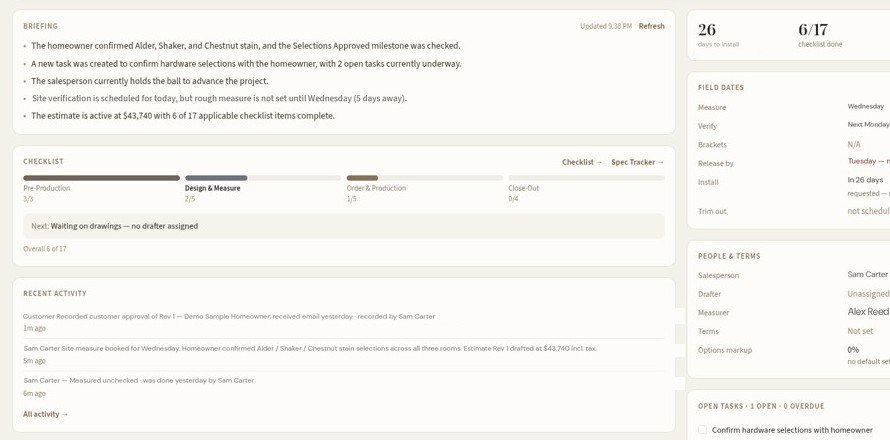
Each job opens with a plain-English briefing of what changed and who has the ball, under alerts for anything at risk: installs coming up with open checklist items, missing specs, drawings not yet approved.

BriefingsA short summary of recent changes, who has the ball and what's still missing on every job.
AskAsk about a job, or how GCS Cabinet Manager works, from any screen.
AlertsInstall risk, unconfirmed specs and unapproved drawings, raised before they hold up an order. Readiness alerts and automation rules raise tasks before they hold up a job.
This week's alerts on iPhone: install risk, specs unconfirmed, drawings not approved
Projects · Dashboard
Job dashboard with AI briefing, checklist progress and recent activity
Everything in one app

The whole shop, under one roof.

Each module is built around how a cabinet shop actually works, from the first sketch to the last mile driven.

Sell

Budget Estimator

A ballpark by the linear foot on the first call, with options side by side.

Estimates

Room-by-room, versioned estimates with your logo, allowances and a signature block.

Pipeline

Every job by stage and who owns the next step, in a list or kanban.

Customer portal

Drafts, rooms, key dates and documents for the homeowner, under your name, with signed approvals on record.

Spec & design

Rooms & Specs

Door, drawer, finish, hardware and trim per room, plus appliances and plumbing.

Spec Tracker

Confirmed, needs review or missing, then approve and lock room by room.

Style Finder & Design Library

Preview door, species and finish together, and browse a library of finished rooms.

Plan markup

Annotate drawings or any PDF on iPad, with Apple Pencil, saved to the job.

Order & produce

Drafting hand-off

Send to drafting with a drafter sheet; drawings and CAD files return to the job.

Orders & checklists

Role-owned steps and sign-offs before anything is released to production.

Billing

Queues for deposit due, ready to bill, overage, overdue and paid across every job.

Finish match & samples

Finish-match orders and sample requests tracked against a target date.

Track & install

Job Board & Calendar

Measure, verify and install dates for every active job, plus a shared calendar.

iPhone field app

Schedules, specs, photos, notes and issues, with camera, mic and location.

Field photos by room

Measure and verify photos tagged to rooms, exportable to PDF.

AI briefings & Ask

A plain-English summary of every job, and answers from any screen.

Run the shop

Inbox

Builder schedule updates and team messages, applied to the right job.

Reports

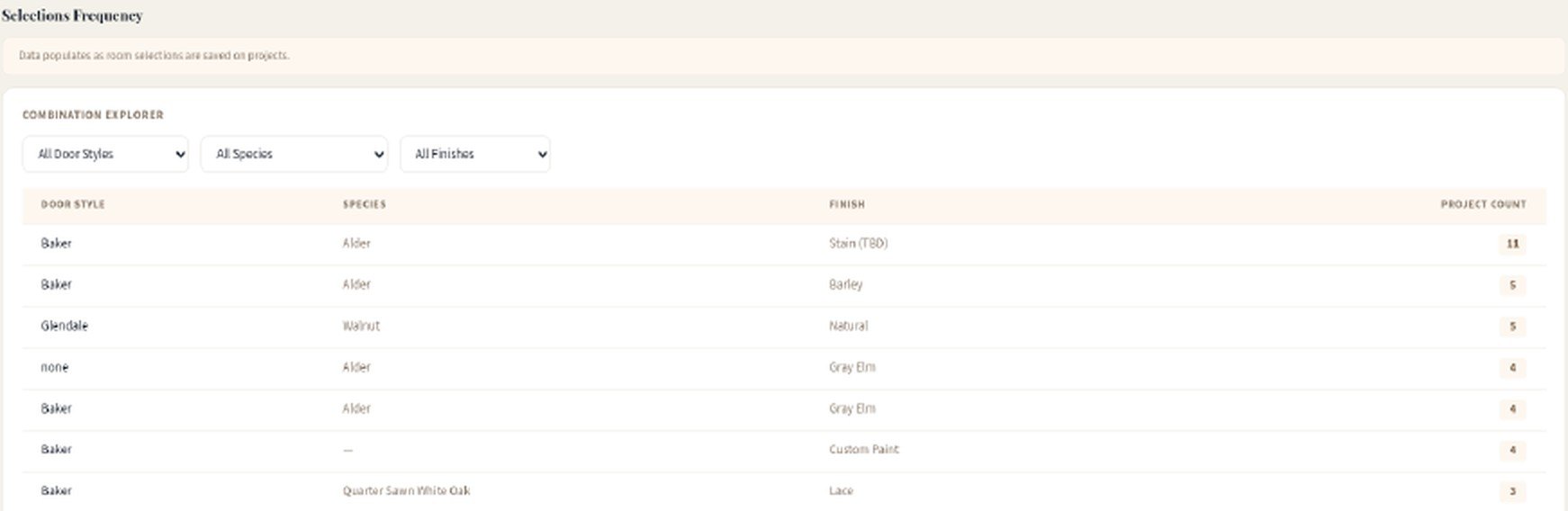
Pipeline value, upcoming installs, and which door, species and finish combinations actually sell.

Map & mileage

Every job on a map, and trips logged by project stop for reimbursement.

Closets

Closet jobs from consultation and wardrobe count to field measure and design.

Roles & permissions

Ten roles, including Scheduler and Billing. Schedulers see every job, never the dollars.

Alerts & automation

Readiness alerts and automation rules raise tasks before they hold up a job.

Help Center

“A day in the life” guides for sales, drafting and field roles.

Branding & templates

Your logo and terms on estimates and the portal, with job templates set up for your shop.

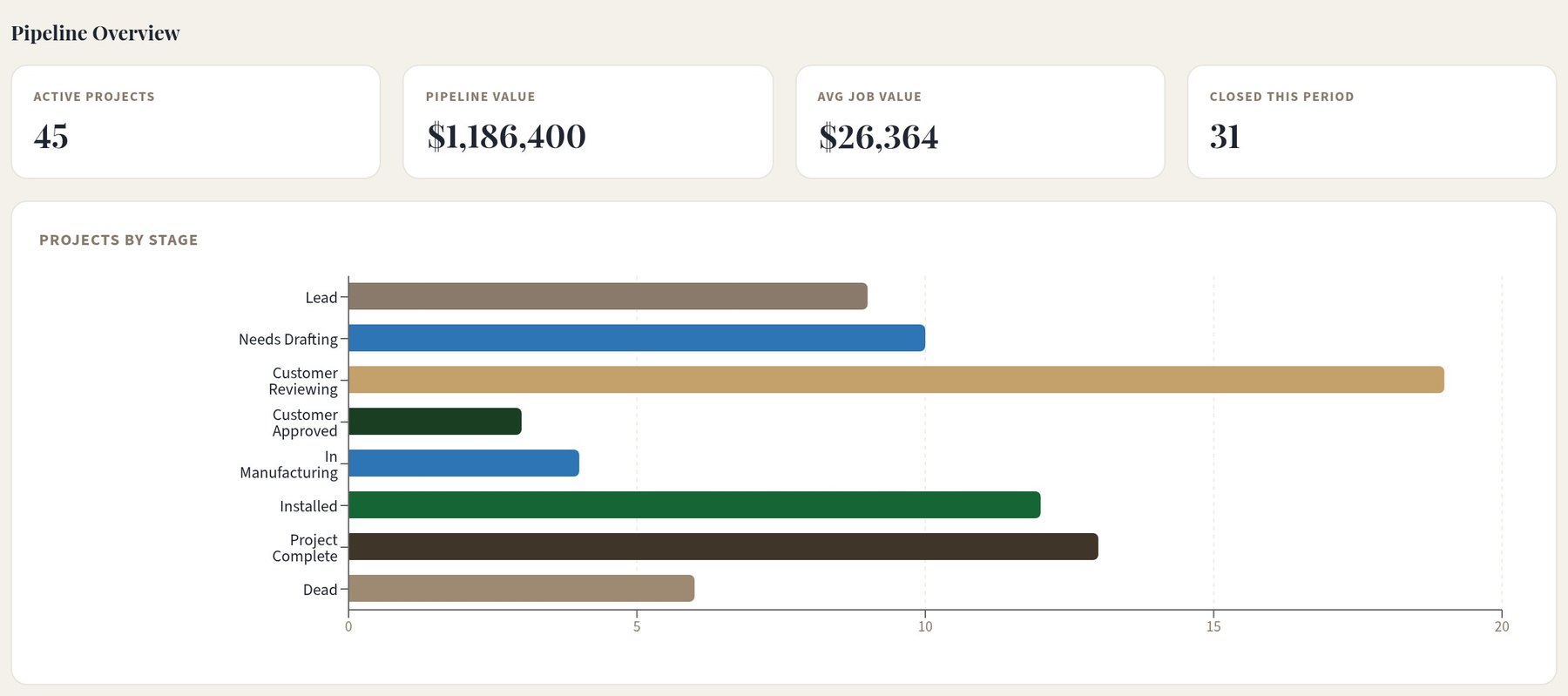
Reports · Pipeline overview
Reports pipeline overview with demo totals: active projects, pipeline value, average job value, closed this period and projects by stage
Pipeline at a glance. Value, average job and every stage.
Reports · Combination Explorer
Combination Explorer table: door style, species and finish combinations with a project count for each
What actually sells. Door, species and finish combinations by project count.
Lars Jarvi with his family at his daughter's wedding
Lars with his family — seven kids and a lot of kitchens later.
Who's behind it

Selling cabinets since 1999, now building the software.

Lars Jarvi has been selling cabinets since 1999, more than 25 years in the business. GCS Cabinet Manager is built for custom cabinet shops and cabinet retailers that sell to builders and homeowners.

Every shop gets onboarding with Lars himself: setting up your process, importing your current jobs and training your team to run jobs in GCS Cabinet Manager.

Lars JarviFounder
Pricing

One plan. Your setup included.

One monthly plan covers the software and remote onboarding with Lars: the app, the Help Center, email support, every update, and a setup built around how your shop already works.

GCS Cabinet Manager
$599per month

Remote onboarding with Lars included.

The software includes

  • Up to 10 usersCrew accounts that don't sign in are free. Need more than 10? Ask us.
  • Sales-to-install workflow
  • Customer portal & approvals
  • Signed approval packages
  • Branded PDF estimates
  • Plan markup
  • Job-site photos
  • Custom paint matches
  • Mobile app
  • Help Center and email support
  • Product updates
Request a demo
Onboarding with Lars
Remote onboarding included

Included with your plan. Lars sets GCS Cabinet Manager up around how your shop already works, over screen share.

Remote onboarding includes

  • Setup of your process: stages, checklists, roles and templates
  • Importing your current jobs and customers
  • Configuring your rooms and specs
  • Team training with Lars over screen share

Optional on-site setup: Lars spends a day in your shop. One-time add-on, from $1,500 + travel.

Your shop makes it betterTell us what you need. Features we build go into the product for every shop, never a private version. Settings, roles, branding and templates are included.
Process consultingWant help with how your shop sells and runs jobs? Lars has been selling cabinets since 1999. Process consulting is available separately.

See it on a sample job, start to finish.

Lars walks you through a kitchen from the first ballpark to install, then answers questions about how your shop runs.

Selling cabinets since 1999. Your demo is with the founder.